Enterprise software

NEC Information Assessment System (NIAS)

Easy and time-saving procedures with only a few steps to reduce and organize unnecessary files after analysis by NIAS.

  • 4 GB or moreMemory (*1)
  • Internet Explorer 9/10/11Browser
  • NTFS (*2), CIFSSupported file servers

NIAS, Benefits

Cost Reduction

Cost Reduction

Easy and time-saving procedures with only a few steps to reduce and organize unnecessary files after analysis by NIAS.

>>For more details

Risk Reduction

Risk Reduction

Appropriate access right settings including Active Directory editing etc., leading to large risk reduction of information leakage.

>>For more details

Efficient Operation

Maximizing the utilization of folders and files in shared file server, while simplifying operations related to file servers.

>>For more details

NIAS, Collaterals

Presentation Documents

NIAS 4.1 Resource Manamgent Option Presentation Document

NIAS, System Requirements

System requirements

OS Windows Server 2016
Windows Server 2012 / 2012 R2
Windows Storage Server 2016Windows Storage Server 2012 / 2012 R2* As for the OS not in the list here, please contact us for further information.
CPU dual core or more (quad core recommended)
Memory (*1) 4 GB or more
Disk space Approx. 15 GB per 1 TB of scan target capacity
Browser Internet Explorer 9/10/11
Supported Hypervisor VMWare, Hyper-V
Supported file servers NTFS (*2), CIFS
Resource Management Option
Storage OS required for Quota Function
Windows Server 2008 R2 or later
Windows Storage Server 2008 R2 or later
NetApp 7-Mode Data ONTAP 8.1 - 8.2
NetApp Cluster-Mode Clustered Data ONTAP 8.2 - 8.3,
9.0 - 9.3
EMC VNX VNX OE for FILE 8.1
EMC Isilon OneFS 7.0 - 7.2, 8.0 (*3)
EMC Unity UnityOE 4.0 - 4.1
NEC Storage M Series NAS Gateway Virtual File Platform 4.2.2 - 5.1.1

*1 Highly reliant on file numbers in insection path. 
     Followings are rough indication of required memories.

File numbers included in inspection path File Server Usage (TB) Required Memory (GB)
- 2 million files - approx. 1TB 4GB
2 million - 10 million files approx. 1TB - approx. 5TB 8GB
10 million - 20 million files approx. 5TB - approx. 10TB 12GB
20 million - 40 million files approx. 10TB - approx. 20TB 16GB
40 million - 60 million files approx. 20TB - approx. 30TB 24GB
60 million - 80 million files approx. 30TB - approx. 40TB 28GB
80 million - 100 million files approx. 40TB - approx. 50TB 32GB
100 million - approx. 200 million files approx. 50TB - approx. 100TB 64GB

*2 Some function might not work on file system other than NTFS.
     Operation is confirmed with following storages.

Evaluated Storages

NetApp FAS3200 Series
FAS2200 Series
FAS2000 Series
EMC VNX VNX5200 - 8000
EMC Isilon Isilon X200
Isilon S200
EMC Unity Unity 300 - 600
Unity 300F - 600F
NEC Storage NEC Storage HS Series (*4)
NEC Storage M Series NAS Gateway (*5)

*3 Isilon storage requires SmartQuotas (Isilon option) which is paid-for license.
*4 Owner change, authorization confirmation and operation are not supported under NEC Storage HS WORKGROUUP environment.
*5 WORM file system is not supported in NEC Storage M Series NAS Gateway.

* Windows, Internet Explorer, Hyper-V are trademarks or registered trademarks of US Microsoft Corporation in the United States and other countries.
* Vmware is a trademark or registered trademark of Vmware, Inc. in the United States and other countries.
* NetApp, Data ONTAP is a trademark or registered trademark of NetApp, Inc. in the United States and other countries.* EMC2, EMC, VNX and EMC logo are trademarks or registered trademarks of EMC Corporation in the United States and other countries.* All other brands regarding names and products are trademarks or registered trademarks of each owners.


NIAS, Cost Reduction

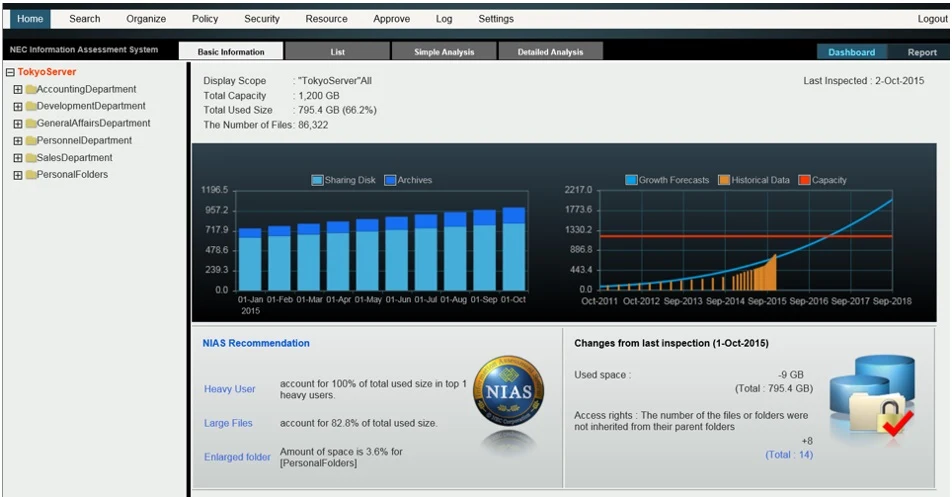
Visualization of the server

View to easily know the capacity utilization status

  • Access through web browser to know the status from NIAS intuitive dashboard
  • Data increase trend helps consider timing of file organization and hardware expansion
Dashboard

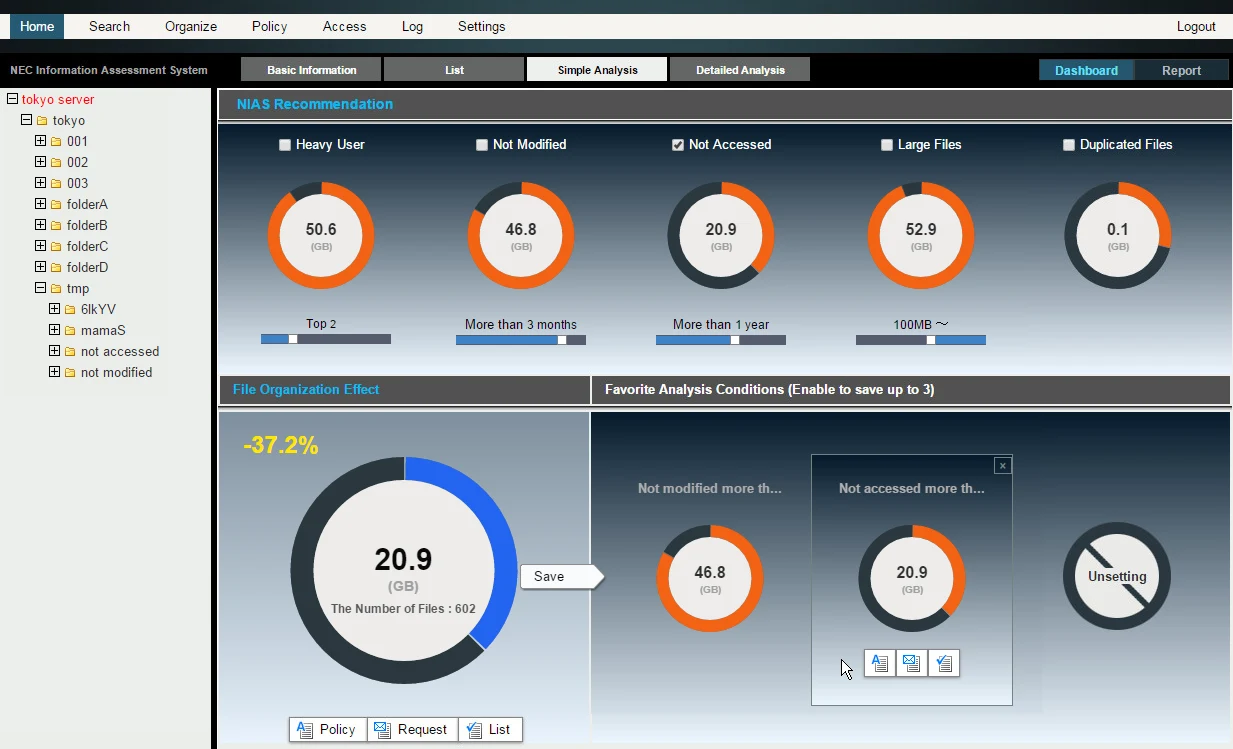
Unique memory DB technology for high speed analysis

  • Easy setting of organization condition to create lists of organization target files
  • NIAS recommends organization condition after finalizing automated analysis of the server

  • File search can be done in a few seconds even in case of large-scale file server of 2 billion files (equivalent to 1PB)
  • Search function linked to Active Directory is available for general users. Unauthorized files to the user are automatically excluded from result if it is done by this person

  • Filtered search using folder directory, file name, etc.

Simple Analysis

File organization / capacity reduction

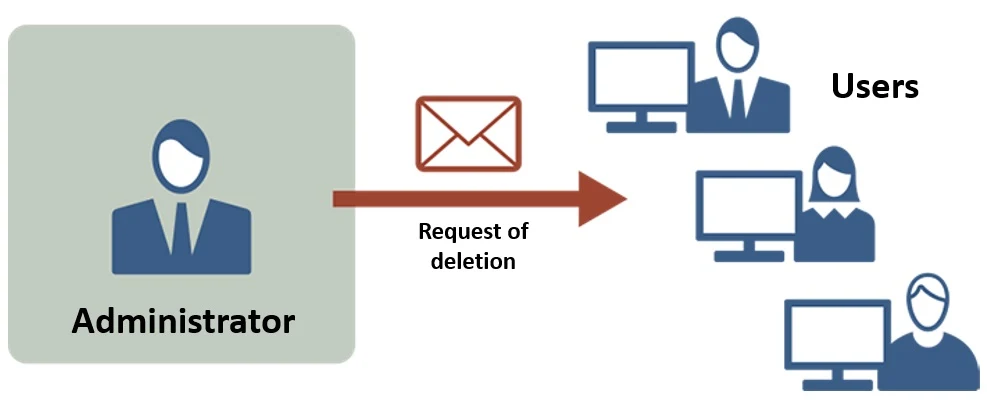
Efficient operation by linkage of users and administrators

  • Administrator can send general users the list of files which is thought to be unnecessary in order to request actual organization
  • User can put additional conditions so as to narrow down the files in the list
  • NIAS helps total file organization operation including administrator's decision making and user's file check
File Oganization Request

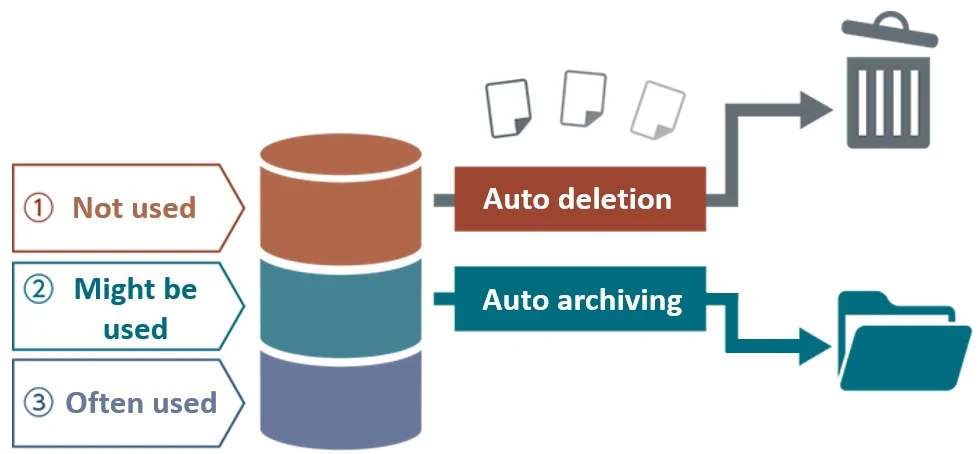
Scheduled deletion / archiving of unused files etc.

  • By setting operation rule, NIAS automates the process of finding specific files based on the conditions (duplicated files, large files, unused files, etc.), and automatically organizes these files
  • Without any effort of administrators or users, file server organization can be automated
  • Flexible setting can be applied (e.g. duplicated files and files not accessed 3 years or longer are automatically moved to inexpensive secondary storage every month)
File Organization
  • 2. Risk Reduction
  • 3. Efficient Operation

NIAS, Risk Reduction

Access rights management

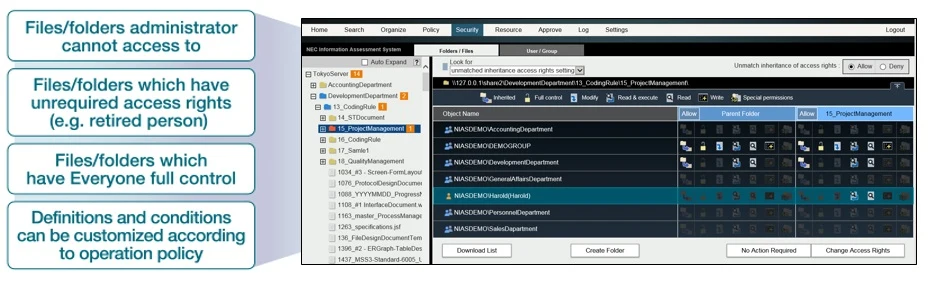
Detect and modify inappropriate access rights setting from huge amount of files

  • Inappropriate access rights settings of the folders are visualized in tree-view

  • Just a single click in tree-view enables to confirm access rights setting of the specific folder, and it can be modified instantly from the NIAS view
  • Access rights setting confirming the update content prevents the misoperation in the update process
  • Setting schedule and expiration date of access rights make the total management easier

Access Right Setting
  • 1. Cost Reduction
  • 3. Efficient Operation

NIAS, Efficient Operation

Resource management (option product)

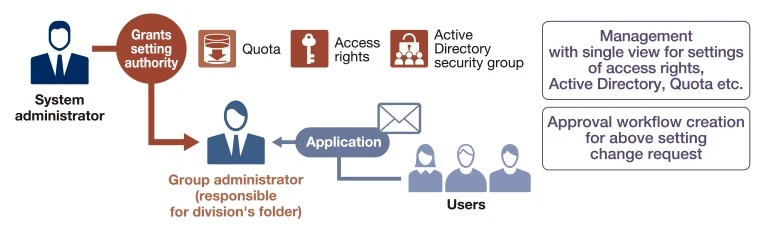
Granting setting authority (Active Directory, access setting, quota) to group administrator enables efficient and proper management

  • NIAS provides integrated management such as resource allocation (quota) and access rights setting, etc. to efficiently support organization change and project activity

  • Setting operation can be granted to each division and/or person in charge of the project
  • Workflow function streamlines application / approval operation
  • By setting execution schedule and Active Directory information beforehand, time and effort for the management process is reduced, leading to preventing misoperation

Workflow Operation

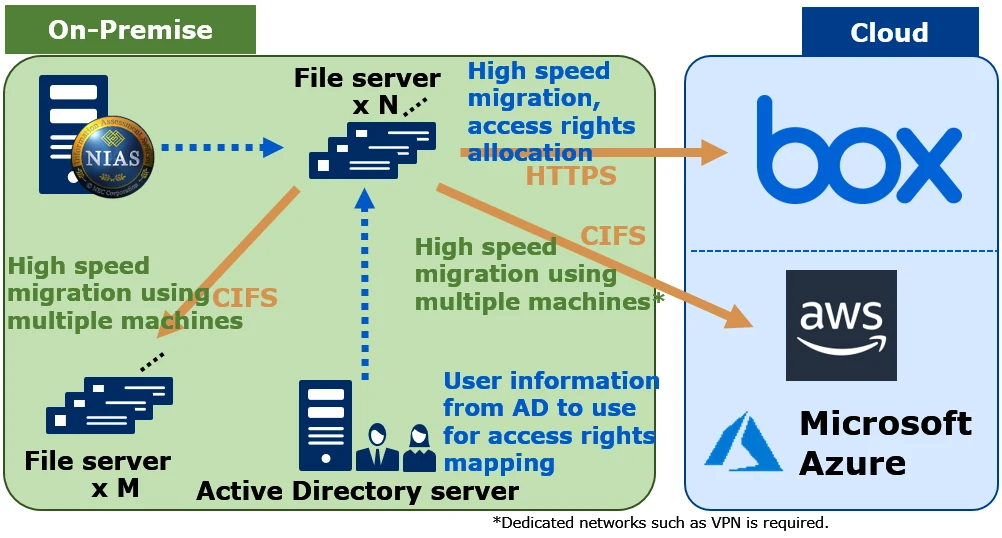
Strong support for data migration of "on-premise to cloud" and "on-premise to on-premise"

  • Migrate data from your on-premises file server to another CIFS file server. It is also possible to migrate data to another model of storage or a file server on an IaaS environment such as AWS or Azure.
  • Also, data migration to cloud storage "Box" is possible.
data migration option function details
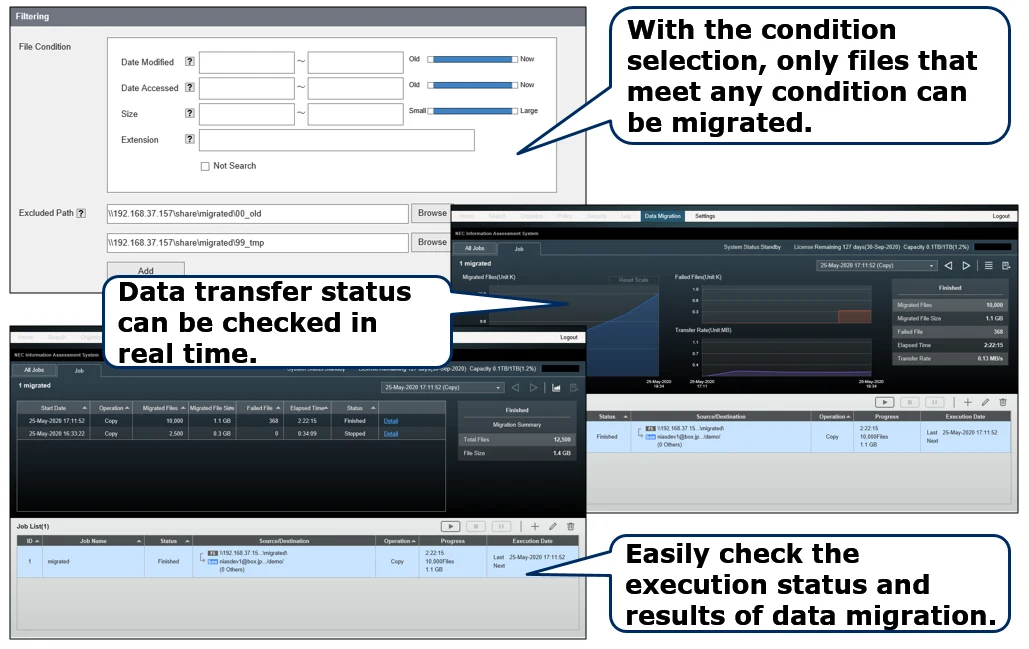
  • Equipped with an easy-to-understand management UI, even those who are unfamiliar with data migration can perform migration work. All operations such as narrowing down the conditions in advance, grasping the status during migration, checking the migration result, and retrying the difference of the files that could not be migrated can be performed from the UI.
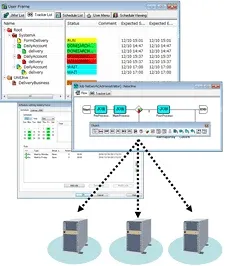
  • You can perform data migration on multiple machines side by side. As a result, data division efficiency and parallel migration can be realized, and data migration can be accelerated.
UI of data migration option and it's explanation
  • 1. Cost Reduction
  • 2. Risk Reduction

Interested in this product?

Request a quote: our team will confirm availability, compatibility and a deployment plan.

✉
WhatsAppCall usRequest a quote