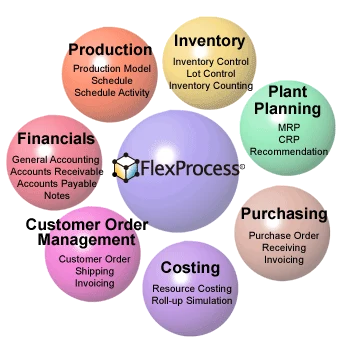
FlexProcess, developed by NEC, is a software package supporting your core business through its seven modules: Production, Inventory, Planning, Purchasing, Costing, Customer Order Management(COM), Financials. FlexProcess is particularly suitable for the process manufacturers, offering unique tools to meet the complex manufacturing requirements to provide data for performance measurement. For installation, NEC offers a variety of support plans that can meet your objectives and schedules.
Flexible customization Facilitate EUC Adapt to business changes
Flexible
Agile
Adaptive
Ready for change
Process - Designed for Process Manufacturers -
Production modeling inventory control Traceability
Process Industry
Business Process
Manufacturing Process
FlexProcess from NEC Corporation is a complete ERP solution with unique concepts, functions and technologies designed specifically for process manufacturers. The Production module, especially, is designed to meet their manufacturing requirements. The complex production processes can be modeled in the FlexProcess system, allowing visualizing the production realities and enabling control of the production department from the administration's perspective. FlexProcess is also very flexible and its ability to change and be modified without making changes to the code means the application will continue to deliver values to meet your diverse business challenges and ever-changing needs.
Product Overview
Core Products
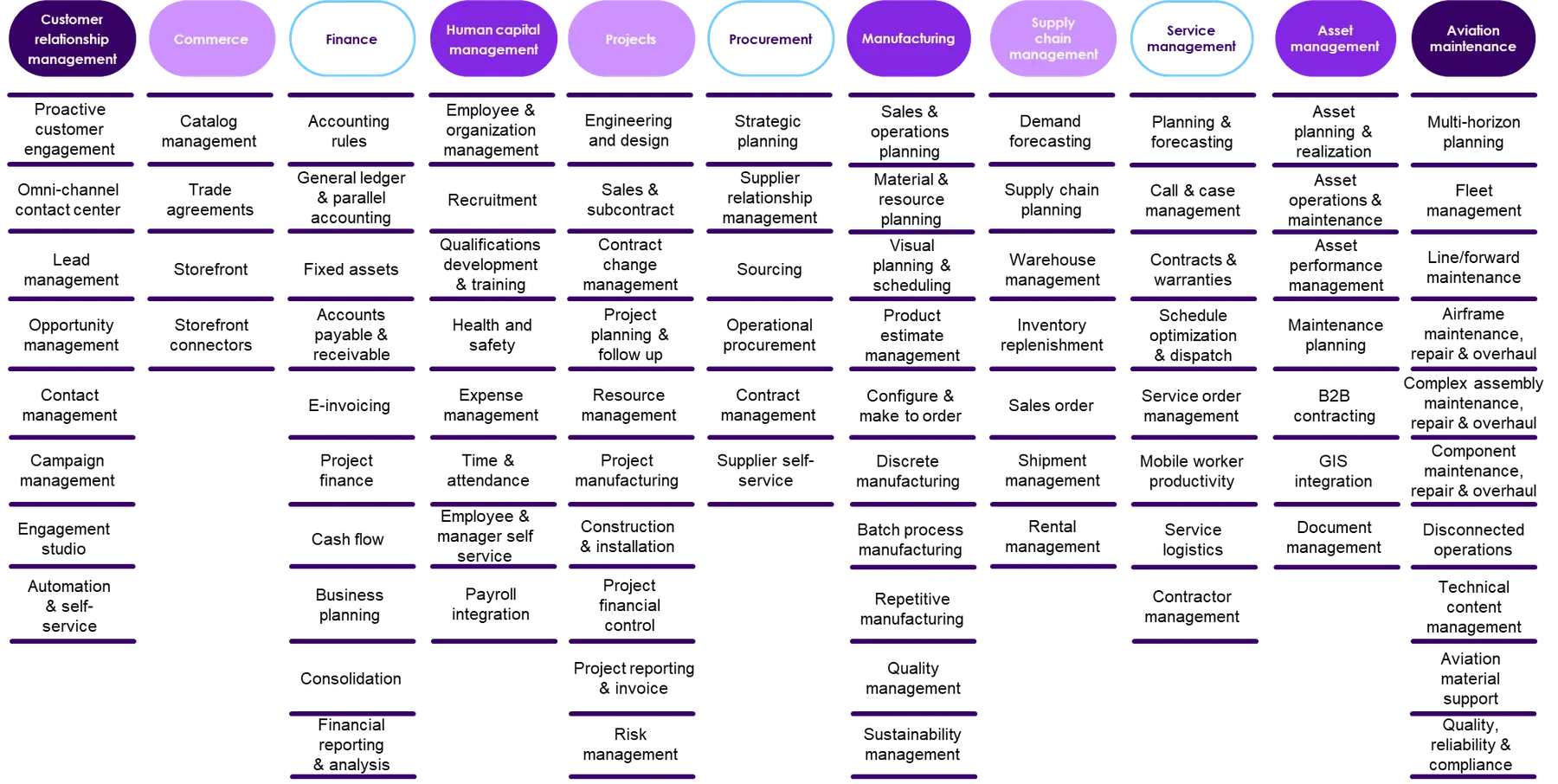
FlexProcess provides corporate level solutions with seven integrated modules. Partial or Step-by-Step implementation is possible in addition to full ERP.
Customization
Customization techniques without modifying the package itself
System Configurations
Supported Configurations incorporating the latest technology
Production
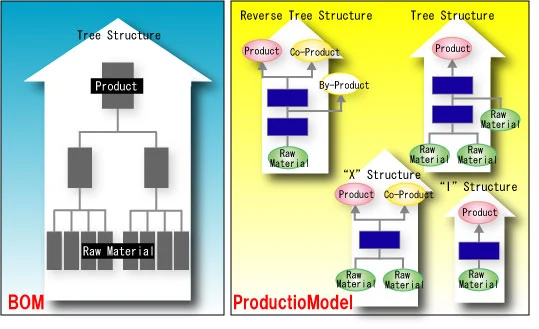
FlexProcess Production Management uses the unique concept 'Production Model' . As opposed to a Bill of Material for discrete manufacturers, Production Model is specially designed for the process manufacturers (food, chemical, etc.) to accurately reflect their manufacturing process that take s place . The Production Model is the heart of FlexProcess and can be used to manage production, planning, and costing for process manufacturers, accurately considering real world constraints and conditions.
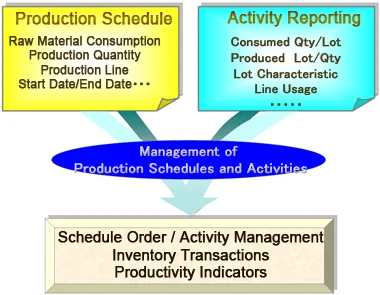
'Schedule' is used to identify what you plan to produce, how much, when, and how, while the 'Schedule Activity Form' is used to record progress on schedules.
Production Model
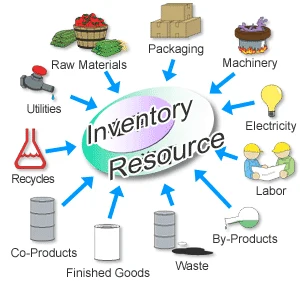
The production model includes input (consumed) and output (produced) resources for each process stage, as well as the sequence of processes required for production. FlexProcess can handle process specifics such as co-products, by-products, and recyclables in addition to recipe and yield.
Production Model can handle variations in process structure, such as reverse tree(X), (I) and others as well as the standard tree structure. It perfectly fits in the process manufacturers where multiple outputs (by and co products) are produced at the same time from a single raw material.
You can define multiple Production Models for one product in the following cases:
Multiple production processes on different equipment
Multiple recipes with different resources to use
Multiple recipes for each season
The sequence of resource usage can be specified for each process stage. Each consumption resource on the process stage has the effective date to indicate the earliest and latest date that the resource can be used.
Production Model Examples
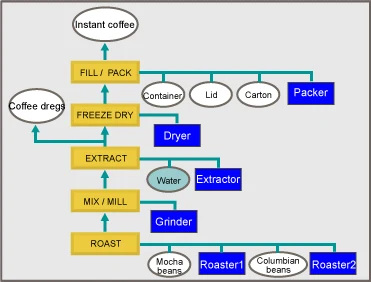
Following is a simplified example of the production process for instant coffee.
Example of division of processes
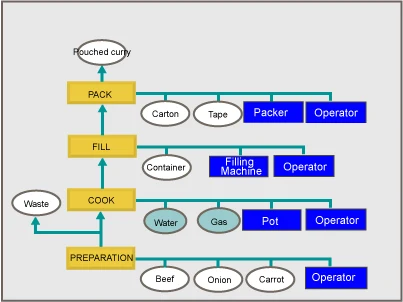
Example of retort pouch curry
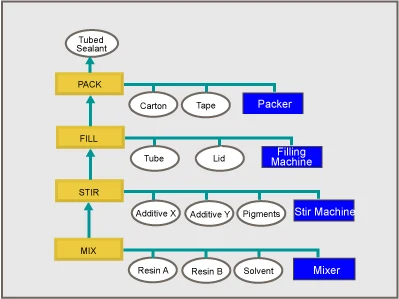
Example of sealing materials
In this example, all the process stages (ROAST, MIX/MILL. EXTRACT, FREEZE DRY, FILL/PACK) required for the finished product is defined in one Production Model. These process stages can be divided into multiple Production Models in regard to how production schedules are released and activities are reported, and where the inventory is produced.
(See the example of division or process stages.)
For each process stage, input and output resources are defined. In the example of ROAST stage, the raw materials (Mocha and Columbian beans) and the roasters are consumed, and the roasted beans are produced as a semi-finished product. It is consumed in the next process stage MIX/MILL. In the extraction process the coffee dregs (leftovers from extraction) are by-produced and become targets of production management.
Production Schedule Management
The Production Schedule is created by defining the Production Model to schedule, the quantity, and the date of production. The Schedule contains all the information needed for production, including consumed and produced resources, machinery used, and resource quantity requirements.
Schedule activities such as consumption/production quantities and lots, can be recorded to update schedules as well as inventory. You can report multiple lots for one resource, and add Reason Codes for specific transactions such as losses.
Record activities against production schedule.
Inventories are consumed / produced.
Compare the Planned schedule and its reported activities to analyze the productivity.
Inventory
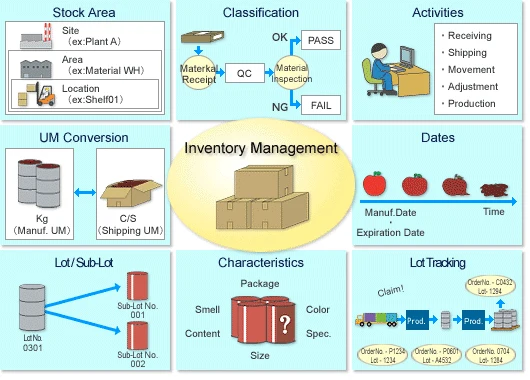
FlexProcess Inventory Management supports the complexities of process manufacturing. It can track all of the inventory, including raw materials, finished goods, intermediates, by-products, etc.. Inventory can be tracked by site, area, location and by unit (e.g. pallet, drum), and managed by lot classifications ,characteristics, expiration dates, and stored in multiple unit of measures.
Increasing the accuracy of inventory management helps to utilize the resources usage and to avoid any miss-consumption/shipment. It also helps to provide auditing evidence for inventory related transactions.
Resources
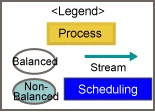
Resource is used to define anything that goes into or comes out of production (e.g. raw material, equipment. labor, utility, etc.). By defining all production required elements in the system, production planning, scheduling, reporting become more accurate. There are four types of resources.
Resources Types
Balanced
Items to be tracked in inventory, such as raw materials, packaging materials, intermediates, and products.
Non-Balanced
Items not stored in inventory, such as electricity, gas, steam, etc., but required to track through production.
Scheduling
Items such as machinery, labor, and other capacity resources.
Stream
Items to represent the flow of material from one production model stage to another. They are not inventoried.
Inventory Storage Areas (Sites / Areas / Locations)
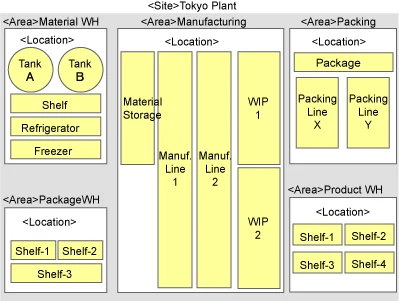
Site, Area, Location are used to identify the inventory storage. For example, sites can be defined for plants, and areas for warehouses, and locations for shelves.
This is an example of site / area / location for a plant.
Lot Management
Each resource can be defined whether its lot/sub-lot is tracked.
Lot / sub-lot
Lots can be further divided into sub-lots for detailed tracking. For example, sub-lots can be assigned by each shift for the same production batch.
Inventory Classification
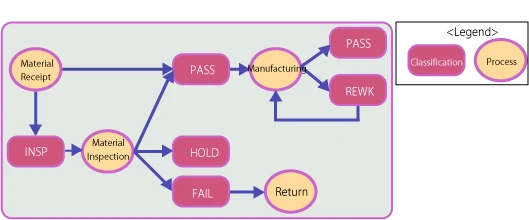
Classifications specify the inventory status, for example,'QC','FAIL','REWORK', etc. Inventory may go through multiple classifications as you receive, inspect, stock, and reject it. Classifications can restrict whether the inventory in this classification can be issued to schedules, or to be available to ship.
Lot Characteristics
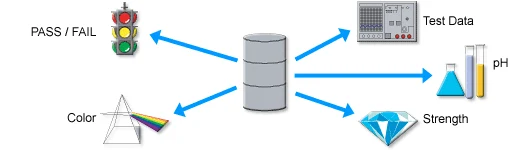
Characteristics are user-defined properties that provide extra detail, about individual resources. Entries can be made by numeric, alphanumeric, and Boolean, and possible entries can be pre-defined in value tables.
Management of Expiration Dates
Individual lots and sub-lots can be tracked with manufacturing and expiration dates. Expiration date can be user entered when the lot is produced, or can be generated by the system according to the resource inventory control definition. Inventory can be inquired by specifying the expiration date in order to determine the usage priority of lots.
Multiple Unit of Measures(UM)
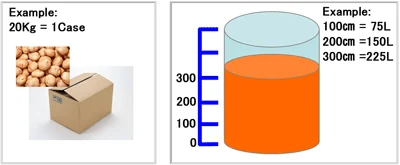
Resource-specific Unit of Measure (UM) conversion can be defined, as well as the standard UM conversions (e.g.1kg=1000g), when a resource has a different UM conversion from other resources. A resource can always be measured and tracked in two different unit of measure (e.g. CASE and KG). Each inventory lot can have different conversion rates.
Inventory Transactions
In addition to the schedule activities in production management, there are four types of activities to report inventory transactions. When activities are recorded and updated, inventory is updated immediately.
Receiving activity
Report receipts of purchased resources.
Shipping activity
Report shipment of customer orders.
User-defined activity
Report inventory movements, including the issue /receipt through the cost center.
Inventory adjustment activity
Report to adjust the inventory quantity as a result of physical counts, etc.
Traceability
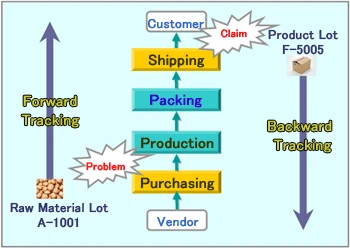
Lot can be tracked from product to raw material or vice versa. Forward tracking allows tracing through shipment lot, production activity, intermediate lots, raw material consumption, and to the purchase order. Backward tracking allows tracing in a reverse direction from purchasing order to product shipment.
Planning
FlexProcess Plant Planning executes Materials Requirements Planning (MRP) and Capacity Resource Planning (CRP) at the same time. It utilizes the available resources to produce the required product in the most efficient and profitable way, resulting in reduction of manufacturing costs and increase in customer service level.
Streamlining Production Planning
The planning run gets its information from resources, production models, inventory, sales forecast, master schedules, customer orders, etc. Production orders or purchase orders are generated as a result, according to the primary sourcing method defined for the resource. The Planning Run considers the resource's lot sizing, the time period to summarize net requirements, and date to calculate requirements, to support the effective and efficient planning run process.
Step-by-Step Planning
Planning can be paused during the run to consider the results at the point and respond to recommendations, perhaps making tactical capacity planning decisions after the finished foods level and before intermediate levels are planned. In this way the number of planning runs can be reduced and the planner released to perform additional tasks.
Balancing of Supply/Demand
Understanding and adjustment of the supply/demand balance is critical to reduce the inventory level in the plant. Accurate planning is particularly indispensable where lead time reduction or customer responsiveness is required. FlexProcess provides tools to examine the important supply/demand relationships, from the material receipt to product shipment. For example, delays in the delivery of raw materials or production schedule can be checked for their impacts on product shipments, and changes in the order specifications and shipping schedules can be checked for their impacts on raw materials purchase orders and production schedules.
Purchasing
The FlexProcess Purchasing module covers the series of work flows from the purchase requisitions of raw materials to purchase order, receiving, and invoice management for production related materials, and automates your procurement process to simplify and reduce the overall costs of purchasing. The functional requirements required for the global business, such as multiple languages, currencies, taxes, trade charges are also supported.
Vender Resource Management
Vendor Resources are used to define the master information about goods and services purchased from the vendor. By defining details for each vendor's purchasing materials, FlexProcess Purchasing establishes better visibility and control of purchasing activities.
One item can be purchased from multiple vendors (Multi-vendor purchasing).
Unit costs can be defined for each vendor item and time period.
Materials can be ordered by UM other than inventory control UM (e.g. KG for inventory UM, BAG for order UM).
Lead time and lot sizing can be defined for each vendor resource.
Updating the receiving activity will automatically update its inventory unit.
Purchase Requisition / Purchase Order
A purchase order line item contains information such as vendor resource, order quantity, unit price, dates of delivery, deliver-to trading partner, and lots. Each line item has its status to manage the progress. Two settings are used to automatically determine if an approval is required or not: the user created the requisition, and the resource requested. Use of the approval feature ensures the security of data processed.
Multi-Site Management (Centralized Purchasing)
FlexProcess purchasing allows each site to process purchase orders individually, as well as centralized purchasing from different sites. Centralized purchasing improves operational efficiency and can reduce the purchasing costs.
Streamlining Purchasing Operations
The FlexProcess Purchasing module interacts with the Planning module and the Inventory module for more operational efficiencies.
A purchase requisition is entered either by a user, or by importing planning run results.
Received purchase orders are considered as expected receipts in the planning run.
Updating the receiving activity will automatically update its inventory unit.
The received unit costs are used in the costing run.
Invoice data is transferred to the Financials module as Accounts Payable.
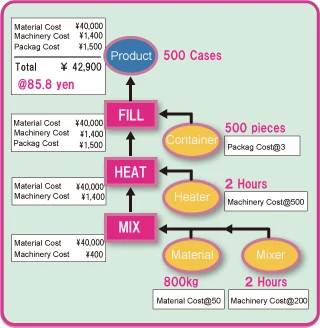
Costing
FlexProcess Costing allow to streamline cost management processes beginning with the cost planning. With the use of activity-based costing techniques, and with resource cost roll-up using standard / actual unit costs and quantities, manufacturing costs can be analyzed by various perspectives (products, product groups, production lines etc.).
Cost-Rollup (Direct / Indirect Costs)
The FlexProcess Costing rolls up costs by resource and by its cost elements. The Costing provides methods to allow direct assessment of manufacturing activities for major cost elements which were previously summarized in groups as indirect costs or fixed costs. This allows a clearer grasp of the profitability of each product or production line and enables decision making based on accurate data.
Improved Cost Control Applicability
The Costing uses the production model in order to accurately reflect the manufacturing realities, by including recycling, waste, co-products and by-products.
Cost Allocation
Indirect costs and fixed costs can be allocated to resource cost elements based on activity reported over a particular time period. Production quantity, labor, line operation hours, etc., can be used as the drivers for allocation, to provide operation based cost roll-up and its analysis.
Cost Roll-Up Simulations
Roll-up costs can be simulated by using any unit costs, yields, quantities, etc.
Simulation scenarios
see the effect of changes on rolled costs by changing the unit costs of raw materials
evaluate costs for the product manufactured with a new recipe
see the effect of using new equipments
calculate the expected costs to produce certain amount of products for the period
anticipate changes in supply sources
Customer Order Management
FlexProcess Customer Order Management (COM) is uniquely designed to meet diversifying customer requirements. In addition to providing all of the traditional functions associated with order entry, reservation, shipping and invoicing, COM focuses on details of order entry and shipping for better customer services. COM also provides flexible features to adjust and execute the businessprocesses automatically in accordance with changes in customer needs and market trends.
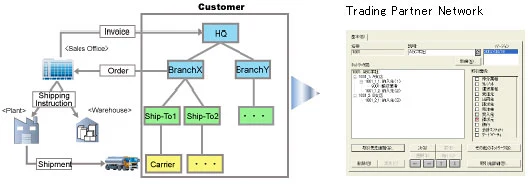
Trading Partner Networks
The Trading Partner Networks gives you a graphical way to map out your entire supply chain of sales and distribution channels, such as customers (order-by, ship-to, invoice-to), brokers, and freight carriers. These networks provides default information during order entry, and are used for sales analysis, etc.
Order Automation Designs
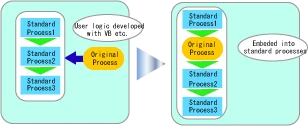
Most of Sales applications require modifications of codes to change the process flows for each customer and/or product. Using the FlexProcess Automation Designs, actions (i.e. price setting, inventory allocation etc) to be executed are defined for events (i.e. order entry, quantity change, shipment, invoice, etc.), thus allowing operational process changes without modification to the package's own codes. User defined actions can be developed and plugged into the automation designs as well.
Possible actions can be those already included in FlexProcess, or the user may incorporate programs implemented with their own logic into the automation designer to allow dynamic action.
Innovative Flexibility
FlexProcess COM provides the innovative feature of Market Profile to allow you to easily and flexibly define trading rules for any combination of companies, lines of business, trading partners, and resources. Segments included in the market profiles are :
Basic rules (billing method, base UM, order entry profile, order automation etc)
Pricing rules (Price determination factors : trading partner, date etc)
Market profiles can be created to apply to many customers or tailored to just one customer.
Financials
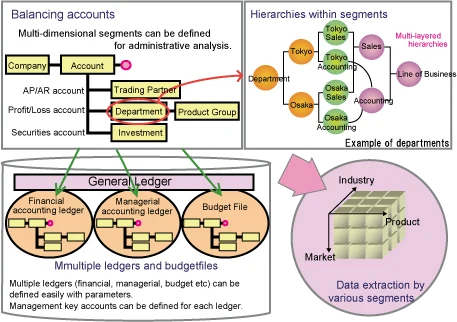
FlexProcess Financials provides the functionality that allows to freely define multi dimensional analysis keys. This feature enables managements from multiple viewpoints therefore helps to solve many of the business operation issues. The design is based on worldwide requirements in order to support global business operations. Also, the Financials module is applicable to any industries including the process industry.
High Level Managerial Accounting
FlexProcess Financials has flexible database structures to achieve the high level management:
Multiple budgets / activities
Multiple currencies
Activity management by segment (P/L, B/S by segment)
Data utilization features
The Financial Application Components
Financials module features:
General Ledger Drill-down from account balance to journal entries, automatic dissolution of headquarter-branch journal entries, multiple budgets, allocations
Miscellaneous Global supports (multiple languages, currencies, taxes) Web reporting, integration with workflow system, and other systems
Customization
FlexProcess provides the method to change and to be modified without making changes to the code, in order to continue to deliver greater value and a longer return on investment.
Tailoring
ERP systems are typically complex and have many fields to cover the various requirements. FlexProcess Tailoring function allow you to select the columns you want to view or remove from view, and to change the order of the columns in the table in order to provide the user with easy-to-use screens. Tailoring can be used in the order entry screens, the activity reporting screens, and inquiry screens.
Add-ons
User-defined new fields can be added to FlexProcess existing objects using Add-Ons. When you create an add-on, a table is automatically created in the database. Add-ons can contain data types of Text, Quantity, Currency Amount, Boolean, Date, etc., just like the standard fields. Add-ons are upgrade-capable.
Query
Use FlexProcess Query to retrieve data from FlexProcess database without developing any applications. Queries can be shared by all FlexProcess users.
Define filters, layout, sort criteria.
The column heading can be modified as you want it to appear in the query results list.
The SQL SELECT statement is automatically generated for the query. (The generated SQL statement can be used as a guide to develop user applications.)
The query results can be easily exported to Microsoft Excel or Microsoft Access by right clicking the mouse button.
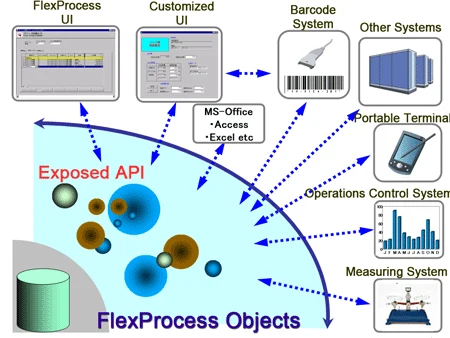
Exposed API
FlexProcess offers a proprietary Application Program Interface (API) which operates through the system using other applications.
FlexProcess is Microsoft COM (Component Object Model) and .NET Framework standard compliant. User applications can be developed by .NET compliant programming languates like Visual Basic.NET, C#, and etc.Versions compatibility is guaranteed for API's so user developed API applications do not get affected by FlexProcess upgrades.
* The company and product names used on this page are the trademarks and registered trademarks of their respective companies.
System Configurations
FlexProcess provides the execution environments which use the latest technologies.
Reduce the cost of system administration and maintenance by configuring the centralized system.
Promote the data integration of business operations by using the unified database.
Allow thin client access to the system from the existing low-resource PC's.
Component
Platform
DB server
Windows Server 2019
RDBMS
Oracle 19c Microsoft SQL Server 2017)
Client
Windows10 Pro/Enterprise
AP Server (terminal service)
Windows Server 2019
Remote Client
Windows10 Pro/Enterprise
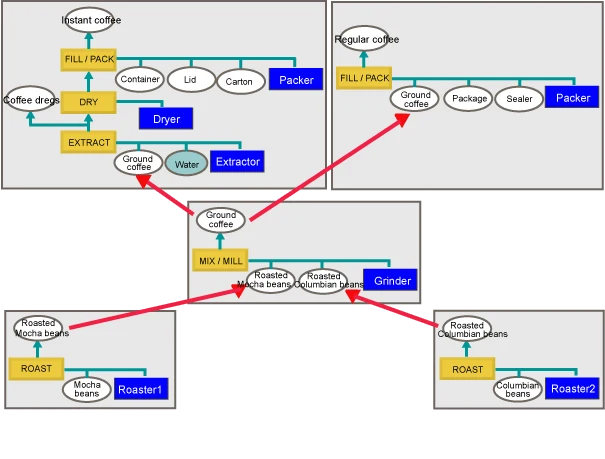
Example of Division of Processes
The diagram below is an example of managing processes by dividing them up, until the product is finally formed. If you wish to perform inventory management for the process output, or if you wish to issue an individual manufacturing schedule, or if multiple products are to be produced from common raw materials (semi-finished products), management may be performed in divisions in this way.
IFS and NEC Accelerate Digital Transformation of Core Industries with Domestically Managed Cloud Services and Industrial AI for the Japanese Market, Addressing Economic Security- Driving Service Expansion into Capital-Intensive Industries with Manufacturing-Focused Practical Models in FY2026 -
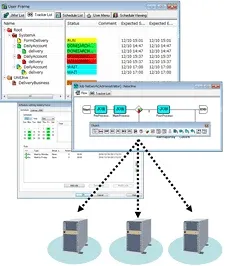
IT systems in business are steadily changing from mainframe environments to open system environments to run databases, billing applications, and a number of other tasks. The role played by Job management in these systems is just as large as in mainframe environments. While open systems like UNIX include certain methods for job management such as running batch files and scheduled jobs with cron, these methods do not match the capabilities of true job management. NEC Corporation offers JobCenter – a true multi-platform job management, in a versatile and easy to use package.
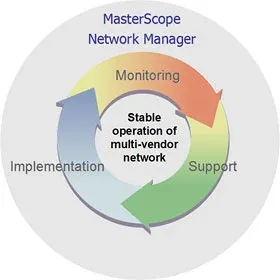
MasterScope Network Manager is operations management software for managing multi-vendor networks. In addition to managing configuration, troubleshooting, and performance of a network, Network Manager fully supports the many tasks involved in network management such as required backing up of device configuration files and software version updates. Network Manager offers comprehensive and flexible support for large to small scale networks to achieve stable network operation and optimal operational efficiency.

 Example of division of processes